
Using DCC Clips on the PHLster Enigma
Posted by Sarah on Oct 29th 2024
Some users like to add a DCC clip to their PHLster Enigma Express or Enigma OS. “DCC” stands for Discreet Carry Concepts, and it’s a brand of metal clip. Is this option right for you? What are the pros and cons? If you want to try it, what clips should you use?
This article covers the Enigma Express and Enigma OS only. Clips are NOT recommended for the Enigma Micro, which has a different attachment system that is not designed for this modification. See the safety note below before purchasing or installing any clips if you have a Micro.
⚠ Safety Warning: Do Not Use Clips on the Enigma Micro
The Enigma Micro uses a different attachment system than the Enigma Express and Enigma OS. It is not designed for clips. Adding bulk under the mounting screws reduces thread engagement, which can cause your holster to detach unexpectedly during use. A detached holster is a serious safety hazard. Failure to follow these instructions could result in severe injury or death. See our safety page for more information and examples.
We do not recommend using clips on the Enigma Micro. The rest of this article applies to the Enigma Express and Enigma OS only.
Why use a clip on the Enigma?
Most people who choose to use a belt clip on their Enigma are trying to solve a particular problem, such as their pants riding up or down, stability issues, or they want to use a DCC clip instead of the leg leash. While clips can work great for some folks, they have pros and cons. Before deciding to use a clip, make sure there isn’t an easier solution to your problems first. Each model of Enigma has a comprehensive instructions page with adjustments, accessories, and troubleshooting tips. Check there first, as the vast majority of problems can be solved without adding clips.
This applies to the Enigma Express and Enigma OS. If you have an Enigma Micro, clips are not a recommended solution — read why above before going further.
Why NOT use a clip?
One of the main benefits of the PHLster Enigma is that it allows you to carry a gun invisibly, with zero signature on the outside of your clothes. That means you can tuck your shirt, for example, or wear a dress with no visible clips or loops sticking out to draw attention. If you add a clip to your Enigma, then you lose this zero signature benefit. The clip will be visible on the outside of your clothing.
The other major benefit of the Enigma is that it allows you to position your gun independently of your waistband. So for example, if your concealment sweet spot is higher or lower than your pants, you can place your gun wherever it’s needed for your body type. When you add a clip to your Enigma, then you lose this benefit, and your gun position is now tied to your waistband position.
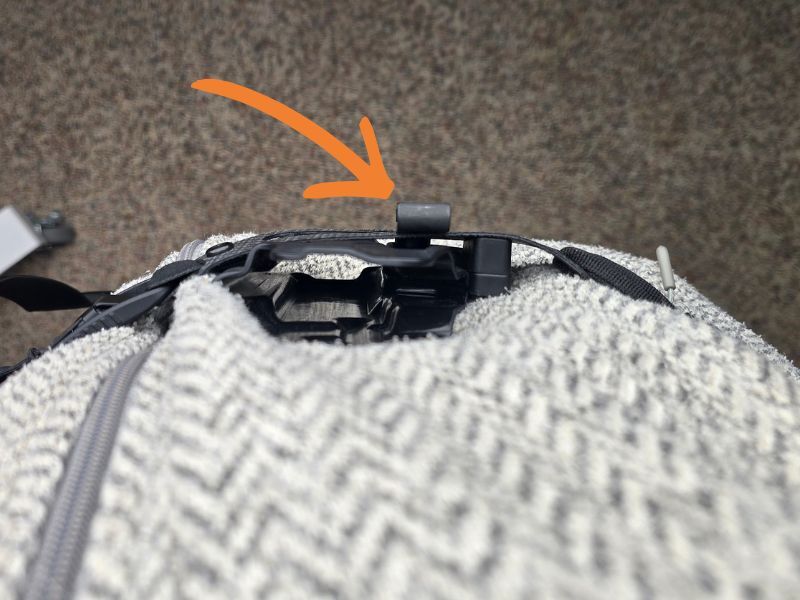
This photograph shows a view from the top, looking down at the holster. You can see how adding a clip to the Enigma sticks out further than the faceplate itself, which could cause printing for some users.
The clip also adds some extra thickness, or bulk, in addition to the thickness of the gun and holster. While some people have plenty of concealment space to spare, those who are on the margins of what they can successfully conceal may not be able to afford the extra bulk.
Lastly, adding a clip to your Enigma can increase stress on the faceplate and holster, since the assembly can no longer move as easily with your body. This could affect the durability and lifespan of your Enigma. And if you have an Enigma Micro, there’s an additional reason clips are a bad idea — the attachment system on the Micro isn’t designed for them at all. See the safety note above.
If none of these cons apply to you, read on!
Frequently encountered problems and their solutions
The troubleshooting tips below are for the Enigma Express and Enigma OS. If you’re troubleshooting an Enigma Micro, please read the note on clips and the Micro before making any hardware changes.
- Problem: Pants riding up or down over the Enigma faceplate.
- Solutions:
- If you’re wearing a belt, make sure it’s thin and flexible, not stiff. Traditional gun belts are not needed with the Enigma, and can cause comfort issues and problems with the pants riding up or down. Use a belt with just enough structure to keep your pants up. Stretchy belts tend to work especially well with the Enigma.
- Check pants fit. If the pants are too tight to fit the gun, holster, and accessories, then they are more likely to cause problems with the Enigma. Pants that fit correctly are essential. Additionally, make sure the rise of your pants (distance from crotch seam to top of waistband) is appropriate for your build, and that your pants aren’t putting undue pressure on your holster. For most people, higher rise pants are beneficial for concealment, but everyone is different.
- If you have a bit of a gut, try pants that fit your natural waist, not under your gut. You can also try placing your gun higher, so it’s not on the downward slope of your belly.
- Try adding friction to your Enigma faceplate with friction tape. For some users, this little bit of extra resistance solves the riding up/down problem completely, or at least makes it less of an issue.
- Solutions:
- Problem: Don’t like the leg leash.
- Solutions for each Enigma version:
- V2 Enigmas (purchased after 3/3/2025)
- Watch the instruction video, and be sure to try EACH style of leg leash.
- Your Enigma comes with two leg leash options, allowing you to choose your favorite and customize your fit. Many people prefer to use the two point leg leash, which can be worn loosely.
- Older V1 Enigmas (purchased before 3/3/2025)
- Watch the full instruction video and try BOTH routing methods. The vast majority of leg leash issues are solved with proper adjustment. Make sure to take your time getting used to it, like any new thing you try.
- If you don’t like the leg leash fabric, try the easy paracord replacement. Many folks prefer the softer feel of paracord against their skin.
- Try the new upgraded leg leash.
- Try an aftermarket leg leash, such as the Bumster, which uses a different routing method.
- V2 Enigmas (purchased after 3/3/2025)
- Solutions for each Enigma version:
Already tried these steps, and still want to use a clip? Read on!
What kind of clips do you recommend?
These recommendations are for the Enigma Express and Enigma OS. The Enigma Micro is not designed for clips — please read the safety note at the top of this article before purchasing anything.
We recommend HLR Discreet Gear Clips, made by Discreet Carry Concepts. They are the slimmest, lowest profile clips you can get, with incredible grip strength and tenacity on fabrics. As of this writing, they are the best option for use with the Enigma, and the only one we can recommend in good conscience.
You could use an Ulticlip, but we don’t recommend them because they are bulkier, heavier, they print more, and they tend to wear out and lose grip on fabrics over time. We also don’t recommend using any kind of plastic clips – they are thicker than necessary and don’t have the tenacity required to reliably hold on fabrics. (Remember that if you’re using a clip instead of the leg leash, the clip cannot slip or you could foul your draw in an emergency.)
While the DCC Monoblock is a quality belt clip, we don’t recommend it for the Enigma because it’s a) larger than necessary, and b) requires a holster with clip blocking at the top, which isn’t necessary for the Enigma and adds extra bulk. The bottom teeth of the Monoblock would also contact the Enigma faceplate, which could potentially cause abrasion and premature wear.
Where do I get a DCC clip?
You can buy them directly from DCC, or you can google the clip model you want, or you can buy them from your favorite supplier. That’s up to you. Just make sure you’re buying for an Enigma Express or Enigma OS — clips are not recommended for the Enigma Micro.
What size clip should I get?
Again, these size recommendations are for the Enigma Express and Enigma OS only. If you have an Enigma Micro, please read the safety note before going any further.
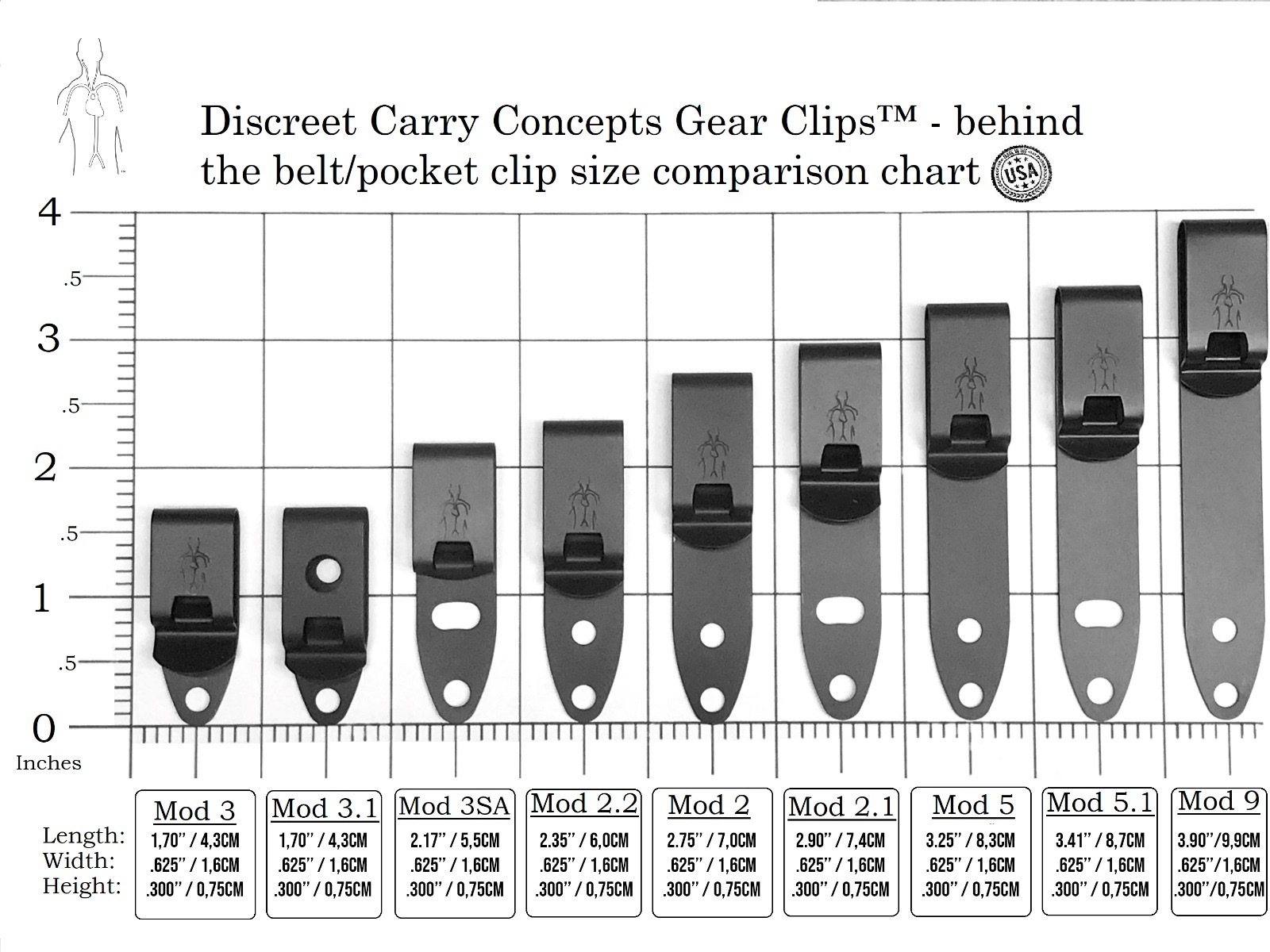
For the lowest signature on fabrics (less visible from the outside of your clothing), choose the DCC Mod5.1 Universal.
If you want to use the clip over your regular pants belt, choose the DCC Mod4 Universal. These have a longer arm, and work on fabric alone, or over a belt. The reason you may want to use the DCC clip over a pants belt is to make your Enigma rig IDPA legal, or because you prefer not to attach the clip to your clothing.
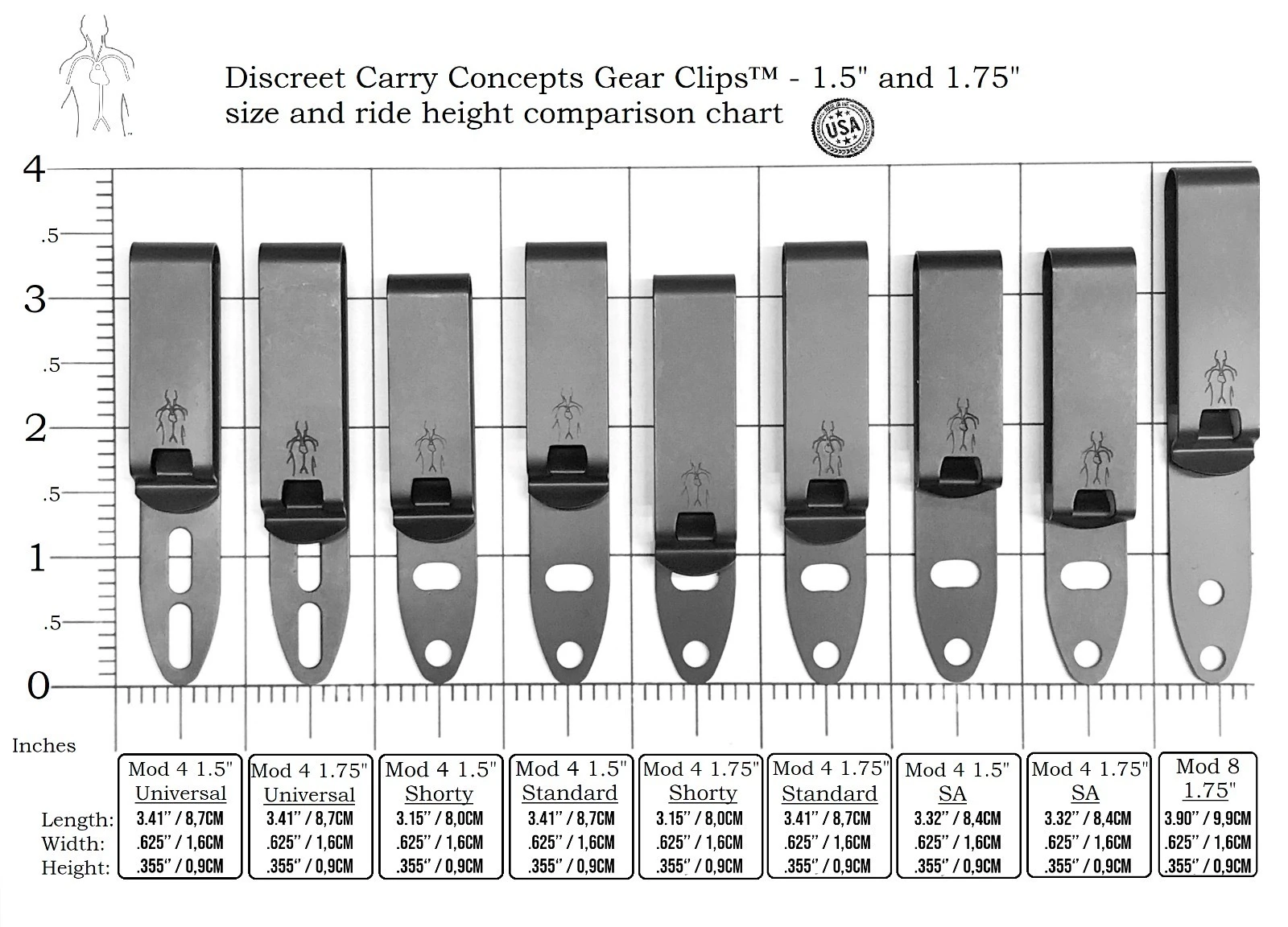
You can use other models of DCC clip if you already know exactly what kind you need to accomplish a specific task. But if you’re not sure, stick with one of the two recommended above.
How do I attach the clip? What mounting hardware do I need?
If you’re using the Enigma Express or the Standard Enigma OS, you don’t need any additional mounting hardware. The clip will mount over the Modwing, using the same hardware that connects your holster to your Enigma. Put the clip between the screws and the faceplate, as shown below.
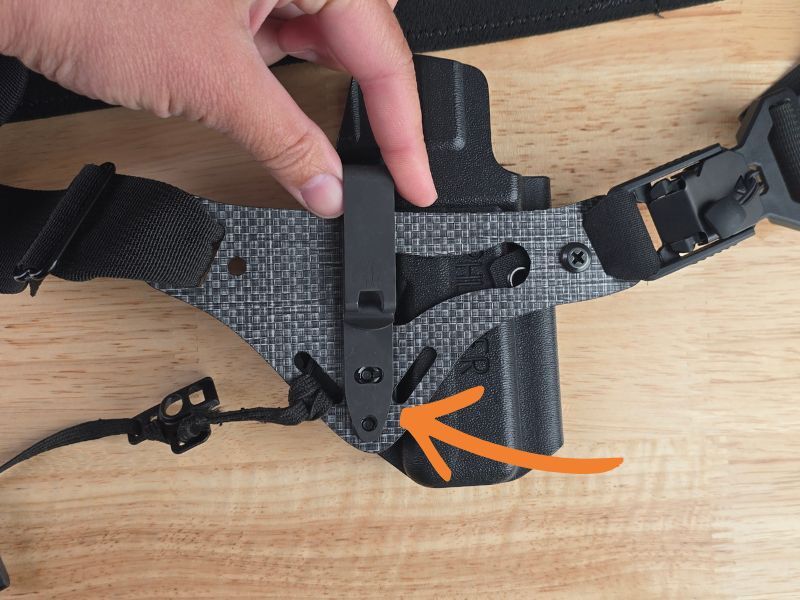
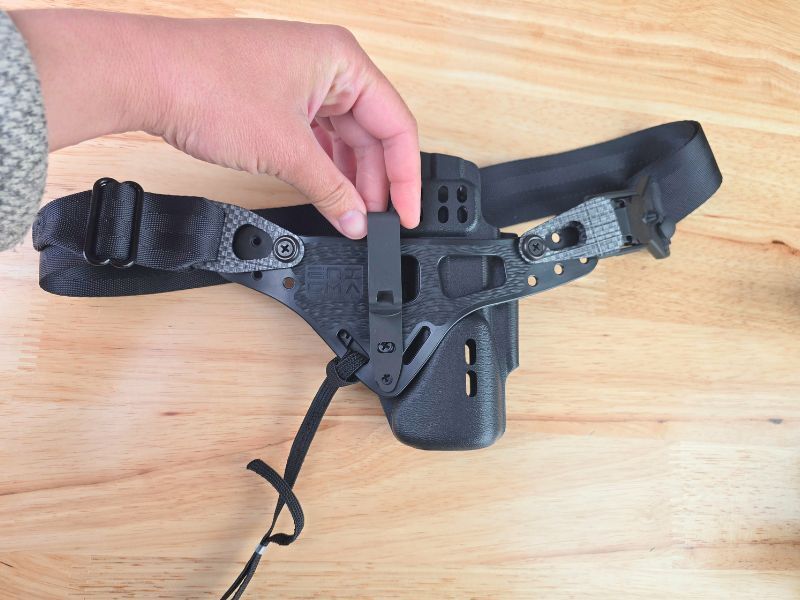
For the light bearing Enigma, the clip will mount on the front face of the holster, using the same hardware that attaches the holster. The clip goes between the screw and the faceplate. You may omit the metal washers over the clip if you wish.
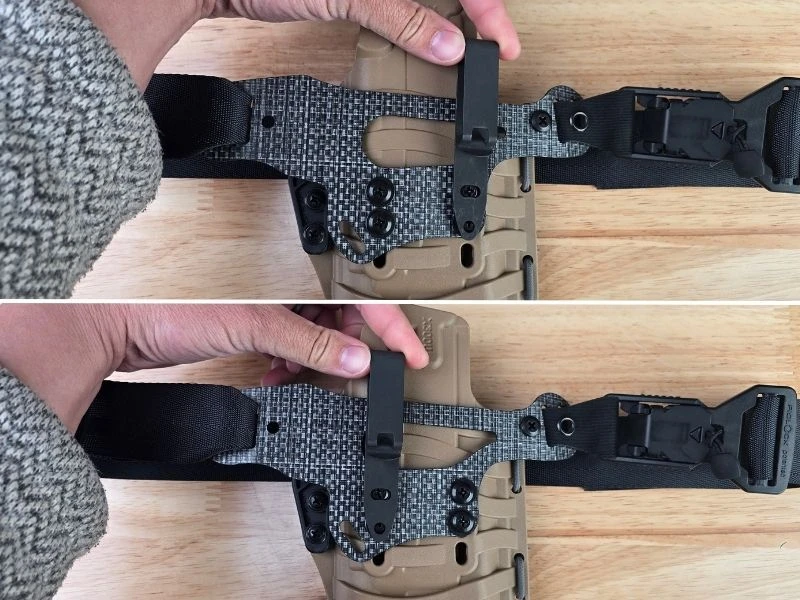
If your holster has lower muzzle clip blocking and you wish to use that instead of the Modwing mount, you will need to buy the following extra hardware. (Source it from your favorite holster hardware supplier, or Google it.)
- 3/8″ Truss head screw, 8-32
- 1/4″ Screw post, 8-32
- 1/8″ thick rubber washer with 0.180 inside diameter
Why don't you sell a kit for attaching a DCC clip to the Enigma?
Our mission is to make the highest performing zero signature concealment holster on the market. While DCC clips can help solve problems for certain users, they don’t meet our zero signature requirements, and in some cases run counter to the original purpose of the product. That’s doubly true for the Enigma Micro, which has an attachment system that simply isn’t designed for this kind of modification — which is why we don’t recommend clips on the Micro at all.